A Practical Guide to AI Agent Memory Architecture
This article was originally published by Actian for Developers on DEV.
An LLM application holds state in exactly one place by default, the context window. That window is rebuilt from scratch on every API request and discarded when the interaction ends. Any agent that depends on it alone is stateless by design. It loses user preferences between sessions, repeats fixes that already failed, and treats a returning user as a new one.
The common response is to attach a vector database, and that solves only part of the problem. A vector store gives you somewhere to put memories. It says nothing about which memories deserve storage, when they should move out of the context window, how they're organized, or how the right ones reach the model at inference time. Those decisions are the memory architecture, and they decide whether an agent improves over time or accumulates noise.
This guide works through that architecture at the system level. It covers the following:
The three production failure modes that stateless agents produce.
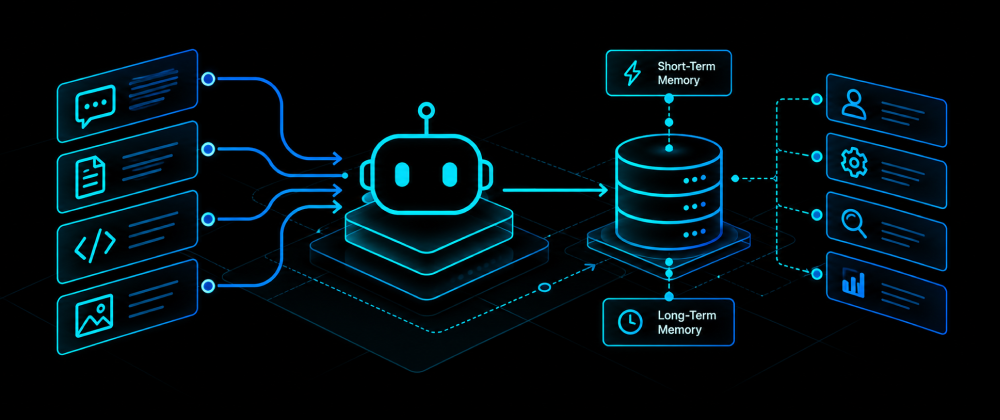
The four memory types and where each one lives.
Five architecture patterns, compared on storage, fit, and tradeoffs.
The write, manage, and read loop that keeps memory accurate.
The failure modes to design against and a staged path for adding memory to an agent.
How agent memory fits into the system
An agent's memory architecture spans three concerns. Storage decides where each kind of memory lives, from the context window to a vector database, a knowledge graph, or code. Lifecycle decides how information moves between those stores, including what gets written, consolidated, versioned, or deleted. Retrieval decides which stored memories reach the context window before each inference call.
Each concern can fail on its own. A good vector index can't compensate for a write policy that stores every message, and a clean memory store is useless if retrieval surfaces the wrong records. The sections below take each concern in turn, starting with why stateless agents fail and ending with a build order.
Why stateless agents fail in production
Without a memory architecture, an agent can't maintain cross-session continuity, learn from outcomes, or adapt to users. It performs well in a demo because everything fits in one context window. In production, it behaves like a new system on every request.
Loss of cross-session continuity
Once the context window resets, every earlier conversation, decision, and interaction is gone unless the application retrieves it from an external store.
A customer support agent asks returning users to verify their account details every time.
A coding assistant forgets project conventions, preferred libraries, and earlier architectural decisions.
A research agent loses track of completed work and gathers the same information again.
Inability to learn from past outcomes
An agent without persistent memory has no record of what succeeded or failed. An operations agent troubleshooting infrastructure incidents may recommend the same failed fix repeatedly because it never stored the outcome. Production agents should capture high-value events such as confirmed fixes, accepted recommendations, and explicit user corrections, because those records drive better decisions later.
Lack of personalization
Users expect an agent to adapt to their preferences, communication style, recurring workflows, and tools. A writing assistant that knows you prefer concise responses, or a DevOps assistant that remembers your Kubernetes standards, can skip questions it has already asked. Without persistent memory, every recommendation stays generic.
The four types of agent memory
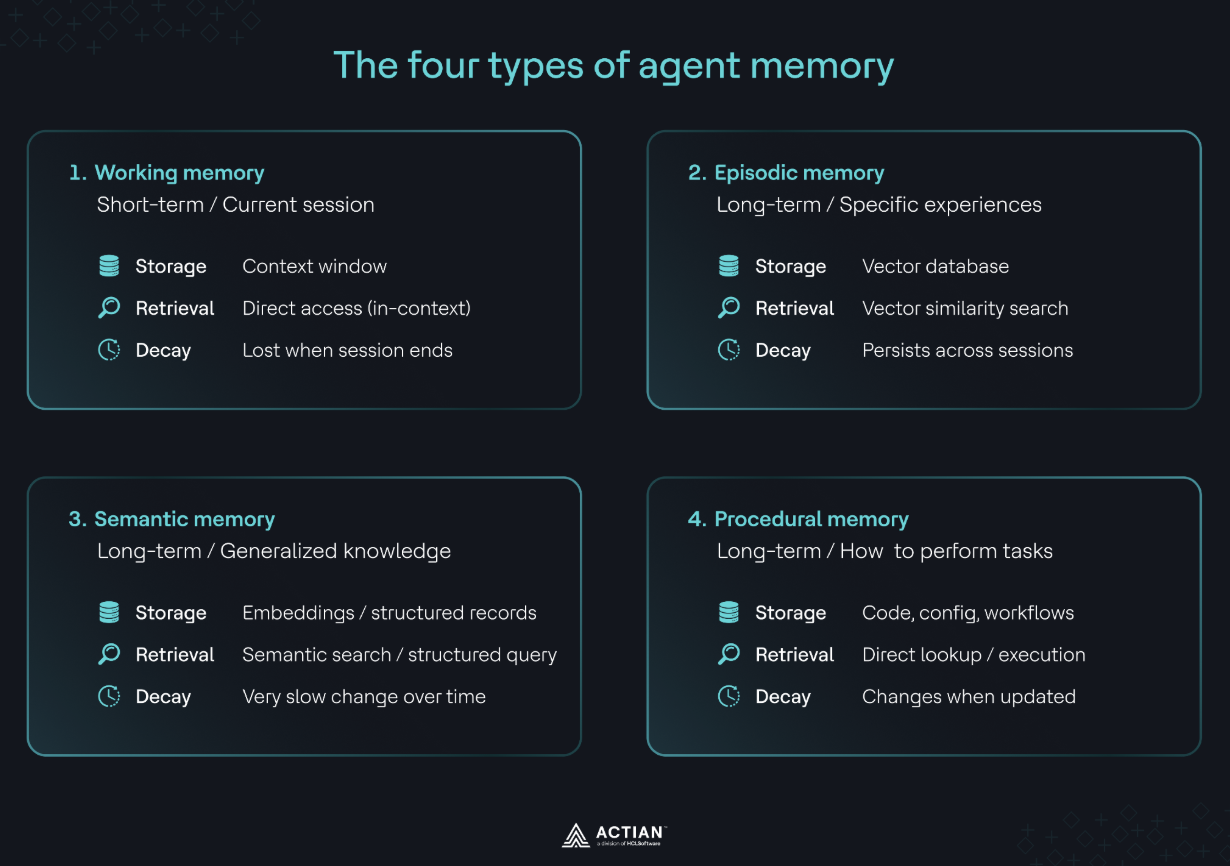
Agent memory is four layers with different jobs, lifespans, and storage mechanisms.
| Memory type | What it holds | Lifespan | Typical storage |
|---|---|---|---|
| Working | Current conversation, reasoning, tool outputs, state | One session | Context window |
| Episodic | Specific past events and interactions | Across sessions | Vector database |
| Semantic | Generalized facts and patterns learned over time | Long-term | Embeddings, structured records, or both |
| Procedural | Workflows, tools, prompts, policies, orchestration | Until the agent changes | Code, configuration, workflow definitions |
Working memory
Working memory is the context window, holding the active conversation, intermediate reasoning, tool outputs, and temporary variables. It's fast because it sits alongside the model during inference, and it's temporary. A larger context window gives the model more to read per request, and it still provides no persistence across sessions.
Episodic memory
Episodic memory stores specific past events that may matter later, such as a customer declining a refund or a developer rejecting an implementation that broke the project's architecture. Production systems usually store each episode as an embedding in a vector database and retrieve it with vector similarity search. For on-premises or edge deployment, the vector database has to stay inside your network, and Actian VectorAI DB provides persistent vector storage with data kept local.
Semantic memory
Semantic memory stores stable facts and patterns distilled from repeated experiences. After several accepted responses, an agent may learn that a user prefers concise explanations. Many systems periodically promote items from episodic memory into semantic memory to reduce duplication and improve retrieval quality.
Procedural memory
Procedural memory stores how the agent works, including tool definitions, workflow graphs, prompt templates, function-calling policies, approval rules, and orchestration logic. It lives in code and configuration and changes only when you change the agent's capabilities, which makes it the most stable layer.
The five architecture patterns
Production systems tend to fall into one of five patterns. Each trades simplicity against capability and operational effort.
| Pattern | Storage | Best use case | Primary tradeoff |
|---|---|---|---|
| In-process (working only) | Context window | Single-session assistants, one-off tasks | No persistence across sessions |
| Flat external vector store | Vector database | Cross-session recall with minimal complexity | Retrieval quality degrades as memory grows |
| Tiered memory (episodic + semantic) | Separate vector stores or indexes | Long-running agents that learn over time | Requires memory lifecycle management |
| Knowledge graph + vector hybrid | Knowledge graph + vector database | Agents that reason over relationships and entities | Higher implementation complexity |
| Enterprise context layer | Governed enterprise data, vector database, knowledge systems | Regulated industries and enterprise AI | Higher operational and governance overhead |
Pattern 1. In-process (working-only) memory
Everything stays in the context window, and the agent forgets it all when the session ends. It suits chatbots, document summarization, content generation, and other short-lived tasks, and it needs no external storage. The agent can't personalize or improve over time.
Pattern 2. Flat external vector store
The application embeds important interactions, stores them in one vector database, and injects the most similar memories into the prompt on each request. This is often the first production-ready pattern because it adds cross-session continuity with little extra complexity. Its weak point is scale. If every interaction is treated equally, irrelevant memories start competing with useful ones as the store grows. For data that must stay on-premises, VectorAI DB can provide the storage layer inside your infrastructure.
Pattern 3. Tiered memory (episodic and semantic)
Episodic and semantic memory get dedicated layers. A single customer interaction stays episodic for detailed recall, while the learned preference for concise answers becomes semantic memory that shapes future responses. Retrieval accuracy improves because each layer has a distinct job. The cost is lifecycle logic for deciding when episodes stay unchanged, when they consolidate into knowledge, and how conflicts between layers resolve.
Pattern 4. Knowledge graph and vector hybrid
A knowledge graph stores explicit relationships that embeddings can't represent well. A healthcare assistant reasoning across patients, medications, diagnoses, and treatment plans needs those relationships. The graph answers structured relationship queries, and the vector database retrieves semantically similar documents or experiences. Running two retrieval systems adds infrastructure, synchronization, and governance work.
Pattern 5. Enterprise context layer
Organizations that can't place sensitive data in public cloud services or unmanaged memory systems retrieve from a governed context layer combining enterprise data sources, access policies, enterprise search, vector databases, and existing knowledge systems. The agent only sees what each user is authorized to see, within retention, regulatory, and data residency rules. This is common in healthcare, where AI systems have to be HIPAA compliant, and it requires identity management, metadata, security policies, auditing, and system integration.
Why the pattern choice matters
The patterns also form a natural progression. Many production agents start with Pattern 2 and move toward Pattern 3 or Pattern 5 as memory volume, governance requirements, and reasoning complexity grow. VectorAI DB fits Patterns 2, 3, and 5 as the vector retrieval layer for on-premises, air-gapped, or edge deployments, while existing enterprise systems keep ownership of the underlying business data.
The write-manage-read loop
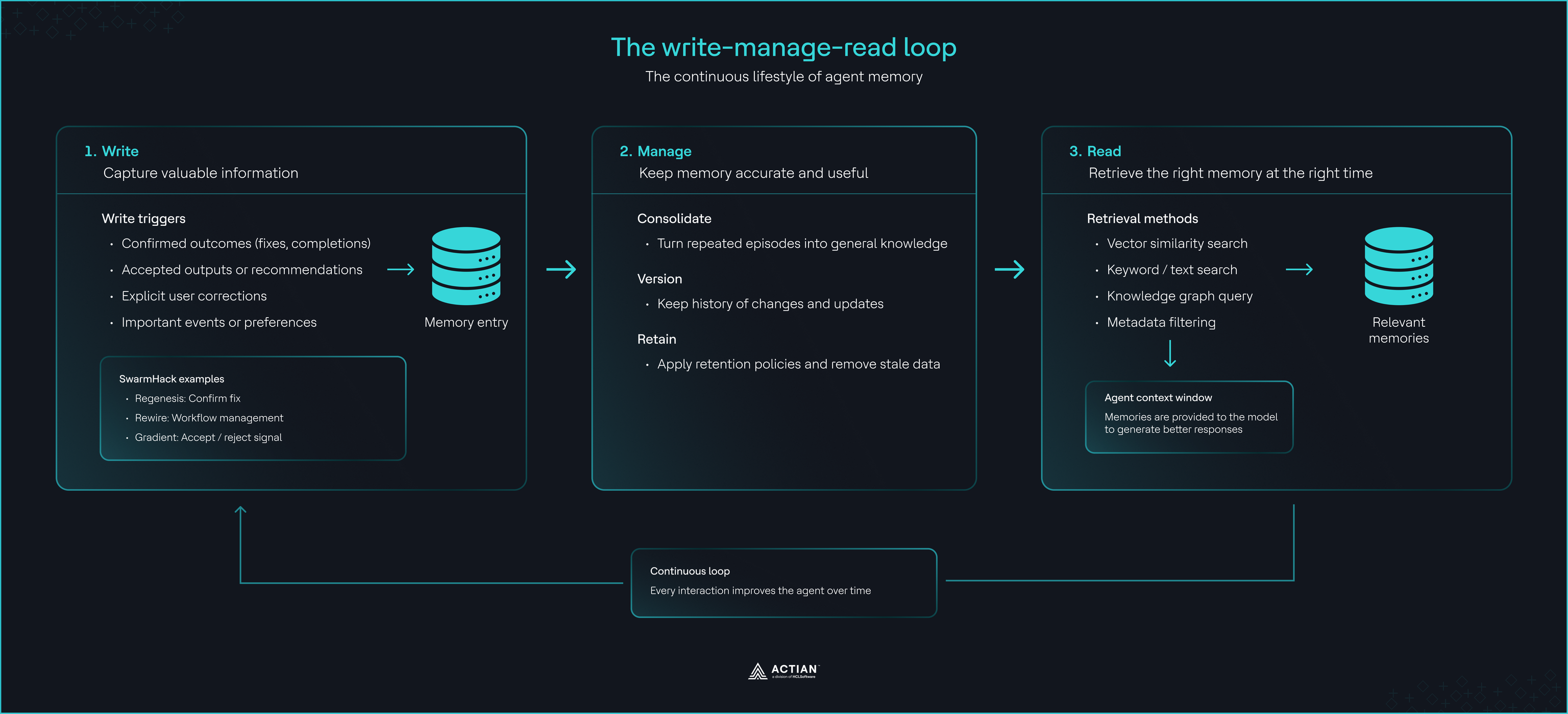
Storage is only one concern. Memory runs as a continuous loop, and a break at any stage produces an agent that forgets important information or retrieves inaccurate, stale, or irrelevant memories.
Write decides what deserves long-term memory
Storing every prompt and response fills the memory layer with duplicates and low-value records. Define write triggers instead. Strong signals include confirmed task completion, accepted recommendations, explicit user corrections, and verified outcomes. A troubleshooting agent should write a memory after a fix resolves an incident and skip every attempt that failed. A planning agent should store the accepted plan and discard the drafts.
Manage keeps memory useful over time
Without management, memory grows larger, slower, and harder to search. Management covers three operations.
Consolidation replaces many episodic records showing the same preference with one semantic memory.
Versioning preserves historical records after new knowledge supersedes them, so the agent can see how knowledge changed.
Retention removes information that has lost value or must not persist for business or regulatory reasons.
Read retrieves the right memory at the right time
On each request, the application retrieves relevant memories and injects them into the context window before inference. Different memory types call for different retrieval methods. Episodic memories are commonly retrieved with vector similarity search, structured facts may come from a knowledge graph or relational database, and some systems combine semantic search, keyword search, metadata filtering, and graph queries. Approximate nearest neighbor indexes such as HNSW keep vector retrieval fast as memory grows, and VectorAI DB provides that layer for teams keeping memory on-premises.
The three stages are coupled. Retrieval tuning can't compensate for poor write decisions, and storing more data can't fix a weak management strategy.
Common failure modes and how to avoid them
Memory failures follow predictable patterns. Designing against them up front costs far less than diagnosing them in production.
| Failure mode | Cause | Prevention |
|---|---|---|
| Context-resident | Treating the context window as long-term memory | Persist important information in episodic and semantic memory |
| Retrieval | Low-value data or embeddings that fit the domain poorly | Clear write triggers, deduplication, regular retrieval evaluation |
| Knowledge integrity | Contradictions between older and newer memories | Version history and consolidation into updated semantic knowledge |
| Governance | PII or regulated data stored without controls | Storage rules, retention policies, encryption, permission-aware retrieval |
Context-resident failure
A large context window lets the agent process more within one session, and all of it disappears when the session ends. Working memory should serve the current interaction while episodic and semantic memory carry information across sessions.
Retrieval failure
Persistent memory still returns irrelevant results when the store holds too much low-value data or the embeddings represent the domain poorly. A smaller collection of high-quality memories almost always outperforms a large, noisy one.
Knowledge integrity failure
An older episode may say a user prefers detailed explanations while a newer semantic memory says they now prefer concise ones. Keeping history while promoting the latest verified knowledge lets the agent evolve without losing context.
Governance failure
An agent storing personally identifiable information, confidential business data, or regulated records without controls turns its memory layer into a liability, especially in healthcare, finance, and government. Define what the agent may store, how long it keeps it, and who can access it. Encrypt sensitive data, apply retention policies, and make retrieval respect user permissions.
Where to start
Start with episodic memory backed by a flat external vector store. It provides cross-session continuity without unnecessary complexity and gives you a foundation to extend.
Step 1. Define your write triggers
Decide what deserves long-term memory before choosing storage. Focus on confirmed fixes, accepted recommendations, explicit corrections, completed tasks, and long-term user preferences.
Step 2. Choose a storage pattern
Pattern 2 is the best starting point for most builds. It's simple to implement, supports semantic similarity search, and persists memory across sessions. Add tiered memory, knowledge graphs, or an enterprise context layer only when new requirements call for them.
Step 3. Instrument retrieval before optimizing it
Log every retrieval request and inspect the memories returned during inference before you change embeddings or databases. Measure how often retrieved memories contribute to correct responses and where irrelevant ones appear. That evidence shows whether the write strategy, memory organization, or retrieval configuration needs work.
Conclusion
A reliable agent memory depends on storage, lifecycle, and retrieval working together. The four memory types define what the agent keeps, the five patterns define where it keeps it, and the write, manage, and read loop keeps that memory accurate as it grows.
Where to take this next
Build a first memory layer. Start with VectorAI DB Community Edition as a flat external vector store.
Add memory to a framework agent. This tutorial on adding persistent memory to a Pydantic AI agent with VectorAI DB implements Pattern 2 with write triggers and user isolation.
See a write-on-verified-outcome loop in practice. How Regenesis built MedShift's self-healing loop with VectorAI DB only stores fixes after external QA confirms them.
Get help. The VectorAI DB documentation covers setup, and the Discord community is open for questions.